
Tuesday, October 21, 2014

Tuesday, August 12, 2014
Monday, August 11, 2014
Cover Letter Examples

Five+ cover letter examples found around the web. I read (most of) them and ensured that they were written within the last year (2013 - 2014). Enjoy the fruits of my labor! I will try to post one of these articles every week if people find them helpful. Comment any examples of cover letters you have found around the web and I'll feature you in my next cover letter example post!
Sunday, August 10, 2014
What should I write in the email of a job application?

You have the perfect customized resume and cover letter, and now you're stuck. Why? The job posting has asked you to email somebody rather than uploading to an automated system. This is both a blessing and a curse. It's a blessing because you know that human eyes will read your resume and cover letter. It is a curse because now you have to type something into that confounded email space. So what do you write in your email?


Thursday, November 28, 2013
Small, but Growing Resume Template Database Built by Redditor

Reddit user /u/thermal_shock has started collecting attractive and easy to access resume templates in this Google Doc folder. Templates include those for Google Docs and for Microsoft Word. While you can convert Microsoft Word templates to Google Doc format, it is recommended that you do not as it can really mess up the formatting.
I will also be adding this link to the resume database on the site as well!
Sunday, November 24, 2013
Can I Use my USAJobs Resume for Non-Government Positions?
Can you use your USAJobs Resume for Non-Government Positions?
 It is highly recommended that you do not use your USAJobs resume for non-government positions. Government jobs often see 9-11 page resumes, while resumes for non-governmental positions should avoid being over two pages, depending on your experience.
A general rule of thumb is if you are a recent graduate or if you are applying to a non-managerial/executive position at a company, your resume should be no more than one page.
If you are applying to an executive position, an expert/senior in your field, or it has been explicitly requested, then two to three pages is more accepted.
USAJobs and various academia fields expect to have a full resume of all of your experience to be considered.
Example non government resume
It is highly recommended that you do not use your USAJobs resume for non-government positions. Government jobs often see 9-11 page resumes, while resumes for non-governmental positions should avoid being over two pages, depending on your experience.A general rule of thumb is if you are a recent graduate or if you are applying to a non-managerial/executive position at a company, your resume should be no more than one page.
If you are applying to an executive position, an expert/senior in your field, or it has been explicitly requested, then two to three pages is more accepted.
USAJobs and various academia fields expect to have a full resume of all of your experience to be considered.
Example non government resume
Wednesday, November 20, 2013


Monday, May 6, 2013
The LinkedIn Overview
I've been dealing in a love/hate relationship with LinkedIn. The concept is there, and the importance of having a website dedicated to professional networking is obvious, but their interface and ability to truly interact and network leaves a lot to be desired. That being said, it is a useful and almost critical tool in today's technology-centric world.
In this article, I am essentially giving a beginner's guide to LinkedIn. How to build a profile, gain connections, and overall use LinkedIn.

Skills and Expertise is an especially important section to fill out. People can endorse you based on your skills and they are brought up in keyword searches by recruiters and other hiring professionals.

This may not gain very many connections at all, but it can be successfully done and is likely the most effective way of sticking out in someone's head.
Groups
Groups are one of the best ways of gaining connections of people who you do not know, and I believe one of the most important functions of LinkedIn - especially when attempting to network. The groups interface is rather weird, but they are still exceptionally useful.
Types of groups to join:
In this article, I am essentially giving a beginner's guide to LinkedIn. How to build a profile, gain connections, and overall use LinkedIn.
Reasons to have a LinkedIn
It gives you a positive social media presence and often shows up at the top of a Google search for your name. I have seen potential employers look at mine in the past, including my current employer.
You might say that your merit alone should get you the job, not some fancy schmancy social media site. Well, you're right - yet also jaded. While a LinkedIn isn't necessary in the job search, it helps. Why would you refuse to do something that only helps in the long term? In a world where every available job position seems to gather a hundred resumes, you need something to help make you stand out.
Building your LinkedIn profile
Building your LinkedIn profile is obviously the most important thing about LinkedIn. If you don't feel like using all the features, at minimum you should have a well thought out profile.
Picture
Yes, you should have a picture on your LinkedIn. When I browse profiles and I do not see a picture, I generally assume that the person is not active and don't click on them.
It should be a decently professional pictures with only your face in it. Avoid full body pics, pictures with friends, nude photos sent to your ex, etc.
 |
| Bad example, unprofessional dress and it's hard to see your face! |
 |
| Good example, well dressed and face shot |
Headline
Your headline will default to your current or last job position at the company you worked at. For example, it will say something along the lines of "Realtor at Generic Realty Company" While this isn't bad, it is generally better to put your field and some kind of descriptor.
Examples:
1. "Professional and licensed Realtor in the Chicago area."
2. "Programmer with 4 years of professional experience."
3. "Instructional design consultant."
Profile
Your summary section is incredibly important. Try to use as much up as possible. This is a potential employer's light onto your personality, your working habits, and your experience in general. This will give a great foundation for what they are about to read. Imagine reading a book and skipping the first chapter. That's what a LinkedIn profile is like without a summary. I particularly enjoy this article about writing a LinkedIn summary.
Your job position descriptions should not be a copypasta of your resume. Instead of bullet points, I like to include a real small summary of what I did at each of my positions and my achievements. You may like bullet points, that's cool. This is an area however that you can go beyond your resume a little bit. Make sure you include achievements under each job position, not just what you did at each job.
Example:
"I sold stuff." vs. "I sold over 1,000 pallets of beer in July 2012, beating the previous record of 940." Which person would you be more interested in talking to?
Take advantage of the profile boxes such as projects, honors and awards, certifications, and volunteering & causes. These add a dynamic feel to your profile and it's what really makes a LinkedIn profile a step above your typical resume as it allows for potential employers to see your work in action.
 |
| Use these! |

Fill out as many skills as possible, even if it means more or less repeating yourself. Maybe the recruiter decided to search for "writing" one day instead of "blogging" for example.
Profile Don'ts:
- If you have been to college, do not include your high school under education.
- Don't make your summary one big block of text. Break it up into headers and paragraphs.
- Don't put anything you would not want a potential employer to see. Duh.
Building Connections
Start with the people you know. Let it search your address book, and begin to add them. Often if they are your coworkers or people you see and talk to frequently, you do not need to specialize your message to them. However, if you do not see them often (maybe you want to add your professor from that class a couple years ago), then it is nice to include a sentence or two that refers to how you know each other.
Example:
Former professor: "Hi Dr. Bob, I hope you are doing well. I enjoyed your class on ethnographic field studies, so I wanted to add you on LinkedIn in order to keep in touch. Have a great day!"
As you build up your connections, do not ignore the "people you may know" option at the top. People are constantly joining LinkedIn!
Connection's Connections
Some people recommend then going through your connection's connections, however I realize that not many people feel comfortable doing so. I have been connected to this way successfully, but it was based off of a message that had it's own merit:
"As a fellow young technology professional I'd like to add you to my professional network on LinkedIn to keep track of your career progress. If you even need an introduction in [City] let me know."After he introduced himself in that way, I responded him thanking him for the request and adding him to my network. He responded:
"Absolutely, how do you know [Mutal Connection] in [City]?"This made him both memorable and he gained brownie points in the networking portion of my brain as the mutual connection was a new coworker and had already proved himself to be a great employee. Someone connected with him would likely be good as well.
This may not gain very many connections at all, but it can be successfully done and is likely the most effective way of sticking out in someone's head.
Groups
Groups are one of the best ways of gaining connections of people who you do not know, and I believe one of the most important functions of LinkedIn - especially when attempting to network. The groups interface is rather weird, but they are still exceptionally useful.
Types of groups to join:
- Local groups
- Industry specific (to either your industry or one you want to get into)
- College alumni
- Interest specific (Oh hey, you like sailing too? Come be our new marketing assistant! We will get along great!)
How to use groups to your advantage:
- Start a general yet answer producing thread. In an industry specific group, I stated that I was new to the industry (and I am) and asked for resources to learn more about the subject. I thanked each person that responded in a comment (you really don't need to comment each time someone responds), and then added a few of them individually, thanking them again for their response in my invite message.
- Participate in other threads whether it is advice, follow up questions, or more. People will often add you or will be open to you connecting with them.
Overall...
Never stop building your network, both in real life and online. You never know which one you are going to catch a break with!
Using Connections
There are many ways to "use" connections, but overall, it's okay to think about it like Facebook. How often do you look at every single friend's profile? Like, never, right? And that's totally okay. Many of my connections I have never interacted with over LinkedIn except for the initial connect stage. That being said, it's still good to have them in case the need arises.
When job searching
One of the first things I did when I began to job search was looking at all of my connections' companies. If their company was hiring for a position I was interested in, I would message them asking them how they enjoyed working there and would mention that I was interested in a particular role there. Many companies offer referral bonuses, so they would likely be happy to refer you. It is well known that employee referrals help significantly when trying to nail down a job!
In addition, I recently had someone connect with me who was going through the interview process at my current company. He asked me questions about the company (general work environment, how was the manager that he would likely be working for, etc.) and generally held a nice amiable conversation with me. It was a smart thing to do because not only is the company interviewing you, you are interviewing them too. Is it a place you would really want to work?
Not job searching
When you're not job searching, it's more difficult to see the value in using LinkedIn and especially in using your connections. That being said, if your company gives you a referral bonus, it would be advisable to check and see which positions are currently open and seeing if any of your connections fit the bill. In addition, you have just built a stronger bond with one of your connections if they do get hired.
It is also useful if you have a very specific industry to connect with higher up professionals and ask them for (easy to give) advice or to simply say hello and that you admire their work. This can help you do fantastic work in your current job, and give you a stronger connection down the road if needed.
References
Maybe I'm just egotistical, but one of my favorite features on LinkedIn are public references. While employers are still going to check the references that you provide to them, these give a potential employer a reason to contact you to begin with. You can say a million positive things about yourself, but until someone else affirms them, they can mean almost nothing.
Ask for references from previous coworkers, employers, professors, etc. I also have references from people I have worked on one time projects with. The worst that will happen is that they will decline.
Also - don't be scared to give references!
Ask for references from previous coworkers, employers, professors, etc. I also have references from people I have worked on one time projects with. The worst that will happen is that they will decline.
Also - don't be scared to give references!
Conclusion
Right now, it's an employers market. Rather than employers having to sell themselves to prospects, it is the other way around. Sell yourself. Having anything that makes you stand out from the crowd is critical today and LinkedIn is one of those ways. Best of luck!
Other Resources
If you would like to do more reading on how to use LinkedIn to your advantage, here are some articles that I deemed useful.
- How to Write Your Killer LinkedIn Headline
- How To Make Your LinkedIn Headline Stand Out
- Four LinkedIn Summary Examples
- Your LinkedIn Profile Summary: How to Distinguish Yourself from Your Company
- The Paris Hilton Principle: Why Connections Aren’t Networks and What You Can Do About It
- How to Build and Nurture a LinkedIn Profile Network
Monday, April 8, 2013
Request for Materials!
Hello job seekers!
I am on the hunt for more resources for you, but I have recently started a new position and I am short on time and energy while I go through their corporate boot camp. Therefore, I would like to open the floor to you, my readers, and see what type of questions or content you may be able to contribute!
So basically, what I would love for you to do is to head over to the About Page and send over whatever content or questions you have!
I am on the hunt for more resources for you, but I have recently started a new position and I am short on time and energy while I go through their corporate boot camp. Therefore, I would like to open the floor to you, my readers, and see what type of questions or content you may be able to contribute!
 |
| How I feel after this week. |
Sunday, March 31, 2013
College Student Resume: Bariol
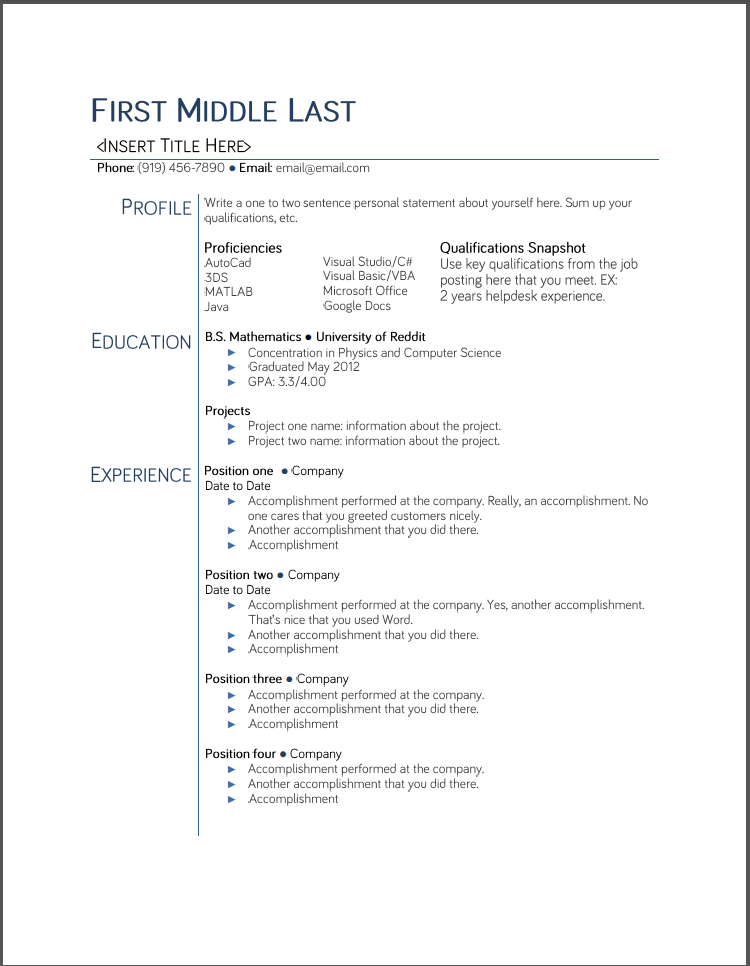
To use this resume properly, you must download the font Bariol here. It is free if you tweet or Facebook about it. You can choose another font as well if you wish. You will need to unzip the file. Installing fonts on Windows.
Please note that this may require a better understanding of Word than the other resumes, however, if you put your time into it, then this is one of the best resumes on the site.
Notes:
- The FIRST MIDDLE LAST name part has a different sized first letter for each word.
- <INSERT TITLE HERE> has a different sized first letter for each word
- The whole thing is a table. If you need to, select all of it and go to the "Table" tab at the top of Word and make all of the boundaries show. This well allow you to see all of the table and make changes easier. When you are done, just make all of the borders disappear again.
- The description text is Black 25% lighter.
Unavailable for Google Docs
Cover Letter Example: IT Role

Dear Hiring Manager,
My name is (Name) and I am applying for the (IT Security Position) you are offering. I recently graduated from North Carolina State University in Mathematics with a concentration in Computer Science, and I am currently employed as a network technician.
In my current job my main roles are network troubleshooting and basic system administration. I help setup new computers and users on corporate domains for a HIPAA certified environment. One of my main focuses is in security to ensure our HIPPAA certification. This includes working in Active Directory on Windows 2008 R2 and Sonicwall. I ensure virus definitions are up to date and speedy spyware removal. I also help educate our clients on proper computer usage to minimize problems and security risks.
I have some basic scripting knowledge using Perl, Python, and Lua. I have used these scripting languages in classroom and personal settings, including automating some functions on my computer. I also received a Network Security Certificate at (Community College) including a Cisco certification course.
Thank you sincerely for your consideration and I look forward to hearing from you.
New Page: Job Search
Hurray! I now have a job search page, powered by Indeed! Check it out above on the link list!

Thursday, March 21, 2013
Resource: Action Words
I have had this idea of making a resource list for a while, and finally it has started. I have talked before about using action words so I made a nice little PDF file for you to carry around and reference when you get stuck on a bullet point. Resume action words should always start your bullet point sentence. For example, instead of saying "Experience in Photoshop and Excel," use "Created materials using Photoshop and Excel." This of course is a very basic way of putting it and your bullet point should be more detailed, but you get the gist.


Check out the resource page in the top tab.
Sunday, March 17, 2013
Hello Reddit!
Hi Reddit! I'm so excited by the response to this website from you guys!


I have updated the contact page so please do not hesitate to use it if you would like to contribute content, have suggestions, or just want to say hello. I will try my hardest to not slack off and update this as much as possible, but I know you guys understand time constraints (cough Reddit cough).
It would be really great of you guys to like this page on Facebook and Twitter and G+ and whatever else, but not required obviously.
A little about me: I like creating templates and I have an obsession with job boards, job searching advice, and more. I recently attained a position based of my enjoyment of making templates so hopefully that means they're good.
Thanks for hanging out and I'll update with a new template soon!

Subscribe to:
Posts (Atom)